What Is Dark Fiber? A complete technical explanation

Dark Fiber refers to unused optical fiber that has been physically installed but carries no active light signal. The fiber is therefore literally “dark.” Organizations that lease or acquire Dark Fiber gain full control over the infrastructure: they decide which equipment, wavelengths, protocols, and speeds are used to light the fiber.

Dark Fiber enables ultra-fast, scalable, and highly reliable connectivity. This makes it popular among data centers, cloud providers, telecom operators, financial institutions, and enterprises with demanding performance and security requirements.

What Makes Dark Fiber Unique?

Full Control

Unlike lit fiber services—where the provider manages the optical equipment—the Dark Fiber customer determines exactly how the glass fiber is used. This includes:

  • bandwidth/speed selection (1G, 10G, 40G, 100G, 400G+)
  • DWDM technology to transmit dozens or hundreds of channels over a single fiber
  • Layer-1 or higher-layer encryption
  • custom monitoring and fault detection

This level of control makes Dark Fiber extremely flexible and future-proof.

High Capacity and Scalability

Since the customer manages the optical equipment, capacity can be increased without laying new physical fiber. A single Dark Fiber pair can be upgraded from 10G to 100G or even 400G simply by upgrading hardware at both ends.

Enhanced Security

Dark Fiber is a dedicated point-to-point physical connection. No other customers share the same path, which minimizes the risk of interception. Combined with optical encryption, it provides a highly secure network, ideal for sectors with strict compliance or data privacy requirements.

Low Latency

Traffic travels directly from point A to point B without intermediate provider switches or routers. As a result:

  • fewer hops
  • lower switching delays
  • predictable latency

This makes Dark Fiber suitable for high-frequency trading, AI clusters, and data center interconnects.

Redundancy Options

Because Dark Fiber is physical infrastructure, organizations can deploy redundant links with fully diverse routes. This offers strong protection against:

  • excavation damage
  • regional outages
  • backbone failures

Route diversity is a key factor in design and SLA agreements.

How Is Dark Fiber Delivered?

1. Annual Lease (Leased Fiber)

The customer rents one or more fiber paths from the provider.

2. IRU (Indefeasible Right of Use)

A long-term (typically 20–30 years) right to use specific fibers. It includes a one-time upfront fee plus annual maintenance. This is the closest option to “owning” fiber.

3. Self-Build

Large enterprises and municipalities may choose to install their own fiber infrastructure, often in cooperation with construction or utility partners.

Typical Use Cases

  • Data center interconnect (DCI)
  • Private cloud connectivity (AWS/Azure/GCP)
  • Telecom and 5G backhaul
  • High-capacity enterprise networks
  • AI and HPC cluster connectivity
  • Redundant WAN architectures across geographic regions

Conclusion

Dark Fiber is a powerful solution for organizations that need full control, maximum capacity, and high security. It combines the robustness of optical fiber with the freedom to build a custom network architecture without the limitations typically found in provider-managed services.
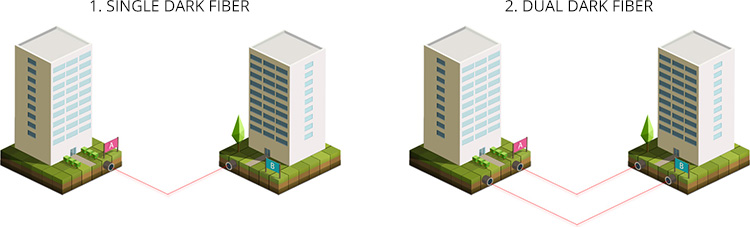

single dark fiber - dual dark fiber

MPLS

MPLS is one of the most important protocols within an IP-VPN. When routers send data packets across a network, they do so based on routing tables stored in the router. Over the years, however, networks have become increasingly complex, making it more demanding for routers to determine the correct route. To simplify this task, Multiprotocol Label Switching(MPLS) was developed.

What is MPLS

MPLS is a routing technology in which data packets are forwarded to different network nodes based on labels rather than IP addresses. This prevents complex searches in routing tables and enables data traffic to be transported more efficiently across the network. In an MPLS-enabled network, all data packets are assigned labels. Based on these labels, routers decide where each packet should be sent next.

MPLS is an independent protocol that only exists between routers specifically configured for it. When a data packet enters an MPLS-enabled network, a label is attached to it. When a router receives the packet, it uses the corresponding label to determine where to send it next.

The router then consults a lookup table and replaces the old label with a new one, indicating the packet’s next destination. With these labels, packets can be transported across the network via a dynamically pre-established path, known as a Label-Switched Path (LSP), ensuring traffic follows the most optimal route.

MPLS as a travel planner for data packets

Let’s use a real-world analogy to make this clearer. When you plan a train journey, you often check a travel planner beforehand so that when you have to change trains, you already know which station comes next. Once the journey begins, you don’t have to think about which station to transfer at, the route is already defined to reach your final destination.

The same principle applies to data packets traveling across a network. The routers act like “train stations” where each packet arrives and is forwarded to the next stop. Thanks to the labels assigned by MPLS, each router already knows which route the packet must take to reach its destination. The router no longer has to “think” about which next hop to choose.

The basics of MPLS

MPLS is scalable and protocol-independent. Because traffic is forwarded based on labels rather than IP addresses, it can establish end-to-end connections over any type of synchronous data link and with any network protocol. The key advantage is that MPLS eliminates dependence on OSI Layer 2 (Data Link Layer) technologies such as Asynchronous Transfer Mode (ATM), Frame Relay, and Ethernet.

This also removes the need to deploy multiple Layer 2 networks to handle different kinds of traffic. MPLS belongs to the packet-switched network family.

Within the OSI model, MPLS operates between Layer 2 and Layer 3. For this reason, it is often said that MPLS functions at Layer 2.5. It was designed as a unified solution bridging circuit-switched and packet-switched network technologies.

MPLS was developed with the same goal as ATM and Frame Relay, all these technologies use labels to transport data over a network. Like ATM and Frame Relay, MPLS supports traffic engineering and out-of-band control, making it a very attractive protocol for large-scale networks.

MPLS VPN

MPLS VPNs are methods that make it possible to create VPN networks using MPLS. As such, MPLS VPN plays a critical role within an IP-VPN. When data packets enter the IP-VPN from a business location, their destination is defined based on a label rather than an IP address.

Because a label is added to the packet, overlapping IP addresses can coexist within the same network. For example, IP address 192.168.20.1 label 50 is treated as a different destination from 192.168.20.1 label 60. Within an IP-VPN, two labels are attached to each packet, a VPN label and a destination label.

The VPN label identifies which IP-VPN the packet belongs to, while the destination label indicates which network device or service within the network the packet is intended for. Using these labels, the packets are sent over a dynamically determined path through the IP-VPN. When the packet reaches the destination router, the destination label is removed, and the VPN label determines which IP-VPN it belongs to.

The packet is then forwarded to the correct device based on its IP address. Once the destination router has identified the correct IP-VPN, the final delivery happens using the IP address.

How an MPLS network works

An IP-VPN relies on MPLS. A network using MPLS is often referred to as an MPLS network. It consists of various network components that work together to ensure all traffic is efficiently transported.

An MPLS network includes the following components:

  • Customer Edge (CE) routers: Routers installed on the customer’s premises.
  • Provider Edge (PE) routers: These are owned by the service provider and connected to the customer’s CE routers. PE routers receive packets from CE routers.
  • Provider (P) routers: Also known as transit routers. These reside in the provider’s core network and primarily forward packets across the network.

Together, these components operate as follows:

  1. When a company sends data packets over the IP-VPN, they first reach a CE router. The CE router communicates with the provider’s PE router (for example, via static routes or a routing protocol like BGP). At this stage, packets are still forwarded based on IP addresses.
  2. The CE router sends the packet to the PE router. The PE router adds a label and forwards it into the provider’s core network. From this point onward, the packet is transported based on labels rather than IP addresses.
  3. Based on its label, each P router forwards the packet along a dynamically established path through the provider’s network until it reaches the destination PE router.
  4. Upon arrival, the destination PE router checks which IP-VPN the packet belongs to, removes the label, and sends it to the appropriate CE router using the IP address.

Forwarding Equivalence Class (FEC)

When data packets enter an MPLS-enabled network, they are assigned a Forwarding Equivalence Class (FEC) — defined by the label. Using FECs, groups of packets with similar characteristics can be transported in the same way across the network.

An FEC may correspond to a specific IP address, an internet service, or a particular traffic flow, allowing MPLS to efficiently manage and prioritize traffic across complex network environments.

What is an Ethernet VPN?

With an Ethernet VPN, you connect your company locations based on the Ethernet standard, effectively creating one large Local Area Network (LAN). As a result, an Ethernet VPN is an excellent solution for companies with multiple sites that want to create a single corporate network without major network changes or exchange large amounts of data between locations.

Connecting multiple locations

With Ethernet VPN, you have the ability to connect two or more sites. Two locations are connected using a point-to-point E-VPN. If more than two locations need to be connected, we create an any-to-any E-VPN.

Point to point

A point-to-point Ethernet VPN connects two locations directly using Ethernet. It is possible to choose between overbooked or non-overbooked connections between the various sites. In MEF (Metro Ethernet Forum) terminology, this is also referred to as an E-Line.

Any to any

An any-to-any Ethernet VPN connects at least two locations with each other. It is possible to link hundreds of sites based on an any-to-any configuration. By default, 1,000 MAC addresses are allowed. Expansion with additional MAC addresses is available at an extra cost. In the case of an any-to-any E-VPN, traffic is not routed through a central location. All sites can communicate directly with each other. An any-to-any Ethernet VPN can easily be expanded with additional locations. In MEF terminology, this is also known as an E-LAN.

High speeds in a switched network

Ethernet VPN is available from 2 Mbit/s up to 10 Gbit/s. E-VPN is a service operating on Layer 2 of the OSI model. The use of routers to interconnect business sites is therefore no longer necessary. An Ethernet VPN is also referred to as a Metro Ethernet Connect (MEC) and is a switched network. In a switched network, data traffic is transported not by IP addresses but based on MAC addresses. This allows you to maintain full freedom in your own IP numbering plan.

By integrating various Ethernet standards, it is ensured that it feels as if all business sites are directly connected, with traffic automatically transported from site to site via a transparent infrastructure running on Layer 2 of the OSI model.

Available everywhere in the Netherlands and beyond

We provide Ethernet VPN throughout the Netherlands, regardless of the geographical location of your sites. Within the Netherlands, Ethernet VPN can be implemented in both Point-to-Point and Any-to-Any configurations.

In addition to business sites in the Netherlands, your international branches can also be connected to the Ethernet VPN. Thanks to our international network, we can deliver Ethernet VPN in large parts of Europe and the rest of the world.

High flexibility & availability

An Ethernet VPN is an extremely flexible solution for connecting business locations. Hundreds of sites can be connected to a single Ethernet VPN. For each business site, you can specify which carrier (physical connection) is used to deliver the connection to the Ethernet VPN. Depending on your needs, an Ethernet VPN can be delivered via Business Fiber, a microwave link, Ethernet over Copper, or a combination of these carriers.

By implementing redundant connections for all or specific sites within the Ethernet VPN, availability levels of 99.9% or higher can be achieved. This provides you with a reliable network that easily adapts to future business changes.

Retention of your own VLAN configurations

In our core network, we use VLAN Tagging to keep traffic from different Ethernet VPNs separated, while allowing each Ethernet VPN to use its own internal VLANs. This is made possible because our core network supports Q-in-Q (802.1ad). We assign each Ethernet VPN a unique VLAN ID within our core network.

For all incoming traffic, we add an extra VLAN tag with the corresponding VLAN ID, which is removed once the traffic leaves our network. Thanks to Q-in-Q support, it is possible to efficiently and securely transport traffic from different Ethernet VPNs across our network without requiring additional hardware or protocols, while allowing each Ethernet VPN to retain its own VLAN configurations.

No network architecture barriers

With Ethernet VPN Virtual Extensible LAN (EVPN-VXLAN), organizations are given the ability to manage their campus and data center networks through a single unified framework. EVPN-VXLAN decouples the physical network architecture from the virtual network architecture. This enables organizations to provide both Layer 2 and Layer 3 connectivity to all their devices while maintaining a consistent network architecture.

EVPN-VXLAN allows organizations to use applications that still operate on Layer 2, as well as newer applications that run on Layer 3 of the OSI model. This is achieved by virtualizing Layer 2 networks and encapsulating the traffic of these applications into Layer 3 UDP packets.

Through virtual tunnels, the traffic is then transported across the network. This creates the impression that all traffic is carried within a single network, while in reality multiple networks are being traversed. EVPN-VXLAN has therefore evolved into a widely adopted standard that bridges the gap between the campus, the cloud, and the data center network.

What is an IP-VPN?

An IP-VPN is a private network service that allows organizations to interconnect their sites in a secure and predictable way using the service provider’s backbone. Although the concept has existed for many years, it remains one of the most stable, manageable and performance-consistent WAN solutions. This article explains the architecture of an IP-VPN, the components that enable it, and why VRFs and MPLS routing are essential.

What Is an IP-VPN?

An IP-VPN is a Layer-3 private network where traffic between customer locations is isolated from all other traffic within the provider’s network. Unlike site-to-site VPNs over the public internet, encryption is not a default component; isolation is achieved through MPLS (Multiprotocol Label Switching).

Why MPLS?

MPLS adds a label to every data packet. This label instructs routers in the provider network how to forward the packet, independent of traditional IP-routing. This creates predictable paths (Label Switched Paths), enables QoS enforcement, and guarantees complete separation between customers.

The Role of VRFs (Virtual Routing and Forwarding)

A key building block of any IP-VPN is the VRF. A VRF is essentially a separate routing and forwarding instance within a router.

How a VRF works

  • Each customer receives one or more VRFs on the Provider Edge (PE) router.
  • The VRF contains routing information for all sites belonging to that customer.
  • Traffic from one VRF can never reach another VRF.

Why multiple VRFs?

Organizations often segment by:

  • Production
  • Guest networks
  • OT / industrial environments
  • Security-sensitive departments

VRFs enable strict segmentation without requiring additional physical infrastructure.

MPLS Routing and Label Switching

Step 1: CE sends traffic to the PE

The Customer Edge router sends packets to the Provider Edge router. The CE does not need to understand MPLS.

Step 2: The PE applies an MPLS label

Based on the VRF, the PE attaches a label indicating how the packet should travel through the provider’s backbone.

Step 3: Switching through the provider network

Within the backbone, routers forward the packet solely based on its label. They do not inspect the IP packet again.

Step 4: Decapsulation

The final PE removes the label and forwards the packet to the customer site.

Topology and Design Considerations

Hub-and-spoke

Centralized applications continue to drive this architecture, with all traffic routed via a central site.

Full mesh

Every site can communicate directly with every other site, reducing latency and improving application performance.

Hybrid designs

Common in larger networks, combining centralized functions with decentralized traffic flows.

QoS and CoS in IP-VPN Environments

QoS is one of the major advantages of IP-VPNs. Providers can prioritize real-time or business-critical traffic over general data traffic.

Common traffic classes:

  • Real-time (voice/video)
  • Business-critical
  • Best-effort

These classes allow bandwidth guarantees and predictable performance even under congestion.

How IP-VPN Differs From Internet-Based VPNs

IP-VPNInternet VPN
No encryption requiredEncryption mandatory
Predictable latency & QoSLatency varies widely
Provider-managedOften self-managed
No reliance on the public internetDependent on ISP quality

IP-VPN remains popular for environments where reliability and deterministic performance are more important than dynamic cloud integration.

When Multiple VRFs Make Sense

  • Strict departmental separation
  • OT environments requiring dedicated routing domains
  • Compliance-driven segmentation
  • High-security architectures

VRFs remain a clean, robust method for separating traffic without complex overlays.

Conclusion

An IP-VPN is a mature and proven WAN architecture that delivers predictable performance through MPLS, VRF separation and advanced QoS capabilities. While SD-WAN and cloud-native networking are increasingly common, IP-VPNs remain highly relevant for organizations that require reliable, stable and well-governed private connectivity.